
Every time you sign up for a newsletter, make an online purchase, or download a free app, you leave behind digital breadcrumbs. Over time, this becomes your digital footprint.
Cleaning up your presence is simply about shrinking the target you present to scammers, identity thieves, and aggressive advertisers. Here is a practical, step-by-step roadmap to declutter your online past and lock down your privacy moving forward.
Step 1: See What the Internet Knows About You (The Audit)
Before you start deleting, you need to know where your information is hiding. Think of this as taking a snapshot of yourself through the eyes of a curious stranger.
Google yourself in Private/Incognito mode:
Search your name in quotation marks (e.g., “Jane Doe”), combined with your city, employer, or old school. Take note of which sites show your personal phone number, home address, or photos.Reverse-search your profile photos:
Use Google Lens to search your common avatars or headshots (profile photos). This reveals whether your picture links accounts across platforms you forgot you joined.Check for data breaches:
Head over to HaveIBeenPwned and type in your primary email addresses. It will show if your passwords and emails were leaked in past corporate breaches.Find forgotten accounts:
Open your email inbox and search for keywords like “verify your account,” “welcome,” or “confirm your email“ to uncover services you signed up for years ago.
Step 2: Delete Old and Dormant Accounts
Unused accounts sitting on abandoned websites are easy targets for hackers.
Before you start: Make sure you know the master password to your password manager (if you use password manager)! If you clear your browser history or cache without backing up your logins, you could lock yourself out of active accounts.
Deactivate vs. Delete: Many platforms trick you by setting “Deactivate” as the default option, which merely hides your profile while keeping your data intact. Always look for “Delete Account” or “Permanently Close Account” under your privacy and security settings.
Clean up major platforms:
Facebook & Instagram: Both platforms place account removal inside Settings & Privacy > Accounts Center > Personal Details > Account Ownership and Control. Keep in mind that deleting Facebook does not automatically delete Instagram (and vice-versa), you will need to confirm the deletion for each profile individually.
TikTok & X (Twitter): Deleting either of these accounts initiates a temporary deactivation phase followed by a 30-day grace period before your data and handle are permanently wiped.
LinkedIn: Use the "Close Account" setting to permanently purge your profile, endorsements, and network connections.
Reddit: Simply deleting a Reddit account leaves your written comments visible. Use a free cleanup tool (like Redact or Power Delete Suite) to overwrite your comments with blank text first, then delete the account.
Google Takeout (Before Deletion): If you plan to close an old Google account, run Google Takeout first to archive and export any essential emails, drive files, or contacts you want to keep.
Directory tools: Websites like JustDelete.me compile direct deletion links and difficulty ratings for hundreds of popular websites.
Step 3: Scrub Google Search and Maps
Google displays public information even after you remove it from an original webpage. You can request Google remove personal details directly:
Set up “Results about you”:
Google offers a built-in privacy dashboard called “Results about you”. It monitors the web and alerts you whenever your home address, phone number, or personal email appears in Google search results, letting you request removal in just a few clicks.Submit formal removals:
If personal financial information, medical details, or home addresses appear on public websites without your consent, submit a direct removal request via Google Search Central.Refresh outdated search results:
If a website has already deleted your page but Google still displays the old snippet in search results, click the three dots next to the link and request a “Refresh” to force Google to re-crawl the updated page.Blur your house on Google Street View:
Find your address on Google Maps Street View, click “Report a problem” in the bottom corner, and choose “Request blurring: My home”. (Keep in mind: this action is permanent and cannot be undone).
Step 4: Remove Yourself from “People Search” Broker Sites
Data brokers (like Whitepages or Spokeo) scrape public records and package your address history, email, and phone numbers for anyone to buy.
If you find your information on these data brokers’ sites you can submit a removal request.
Search your name and city on a people-finder site to find your specific listing.
Copy the exact URL of that record.
Scroll to the footer of the site and look for links titled “Do Not Sell My Info”, “Do Not Sell Or Share My Personal Information”, “Opt-Out”, or “Privacy Rights”.
Paste the URL into the removal form and confirm the request. (Tip: Use an email alias or disposable email address to verify the request so you don’t hand them your primary inbox).
If you are short on time, automated privacy services such as Incogni, DeleteMe, or Kanary continuously send legal opt-out requests under privacy laws like GDPR and CCPA on your behalf.
Step 5: Adopt Everyday Privacy Habits (Keep Your Footprint Small)
Cleaning up past data only works if you stop leaking new data going forward.
Incorporate these quick digital habits:
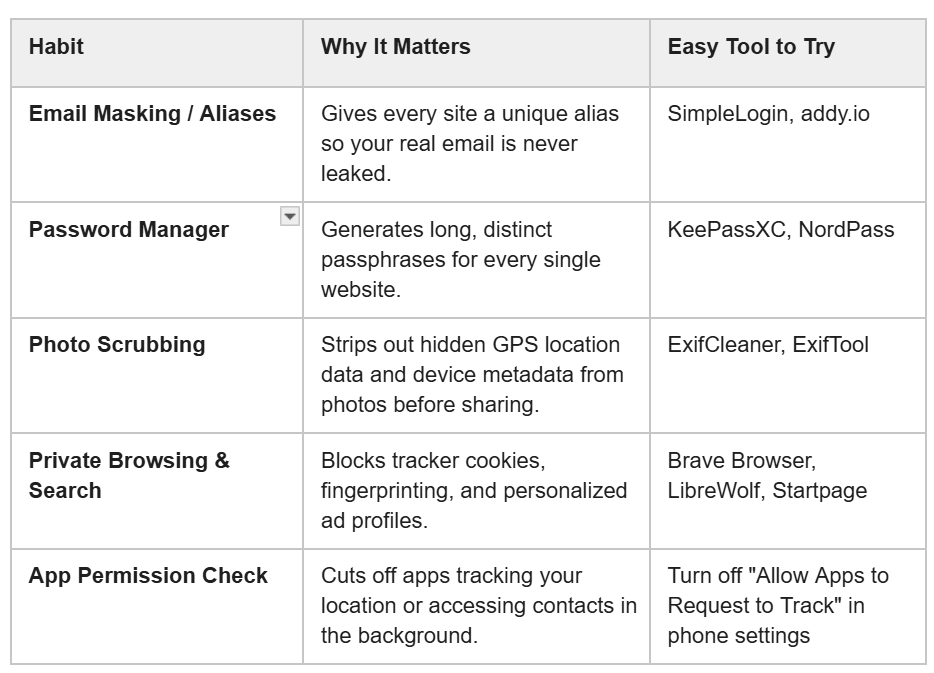
The Big Takeaway
Cleaning up your digital presence is not an all-or-nothing task. You do not have to unplug your router and live off the grid. Start with one step today, and make yourself a smaller target!
REFERENCES:
Here are direct links to the services, platforms, and privacy utilities referenced in the post, organized by category:
Breach & Account Discovery
Have I Been Pwned: https://haveibeenpwned.com
Checks if your email address or passwords have been leaked in known data breaches.
JustDelete.me: https://justdeleteme.xyz
Provides a directory of direct links and instructions to delete accounts from hundreds of websites.
Google Privacy & Removal Tools
Google "Results About You" Dashboard: https://myactivity.google.com/results-about-you
Monitors and lets you request removal of Google search results that expose your personal contact info.
Google "Results About You" Documentation: https://support.google.com/websearch/answer/12719076
Google’s official guide explaining how the “Results about you” removal process works.
Google Personal Content Removal Form: https://support.google.com/websearch/contact/content_removal_form
A submission form to directly request the removal of sensitive personal information from Google Search.
Google My Activity: https://myactivity.google.com
Lets you review, delete, and set auto-delete timers for your Google search and location history.
Email Masking & Aliases
SimpleLogin: https://simplelogin.io
Generates unique email aliases that forward messages to your real inbox without exposing your actual address.
addy.io: https://addy.io
An open-source service that creates disposable and forwarding email addresses to stop inbox spam and tracking.
Metadata & Tracking Protection
ExifCleaner: https://exifcleaner.com
A drag-and-drop desktop app that scrubs hidden GPS location and camera data from photos and videos.
ExifTool: https://exiftool.org
A comprehensive command-line utility for reading, editing, and wiping metadata from nearly any file format.
EFF Cover Your Tracks: https://coveryourtracks.eff.org
Tests your web browser to reveal how unique your browser fingerprint is to online trackers.
Password Managers
KeePassXC: https://keepassxc.org
A secure, open-source password manager that stores your encrypted credentials locally on your own device.
NordPass: https://nordpass.com
A user-friendly, cloud-synced password manager that creates and auto-fills complex passwords across all devices.
Private Browsers
A privacy-first browser that automatically blocks ads, cross-site trackers, and fingerprinting by default.
A hardened, open-source fork of Firefox engineered to stop telemetry, tracking, and browser fingerprinting.
https://mullvad.net/en/browser
A hardened browser co-developed with the Tor Project to combat data collection and make all users look identical to trackers.
Private Search Engines
A fully independent search engine that uses its own web index without profiling you or collecting queries.
Delivers un-profiled Google search results via an anonymized proxy without logging your IP address or search history.
A tracking-free, completely independent crawler-based search engine that builds its own index from scratch.
Data Broker Opt-Outs & Privacy Requests
YourDigitalRights: https://yourdigitalrights.org
A free tool that helps you send legally binding data deletion and opt-out requests to data brokers.