
Privacy loss isn’t a break-in. It’s the default setting.
It happens quietly, through actions that don’t feel like decisions at all. A quiz app you downloaded for fun in 2015 didn’t just show you your “spirit animal”, it also asked for access to your friend list and public profile, and quietly kept both. A loyalty card you scanned for a discount didn’t just save you 10%, it tagged that purchase to your name, building a record of exactly what you buy and when. A cookie banner you tapped “Accept All” on, just to get to the post, didn’t just remember your login, it let ad networks you’ve never heard of start following you across other websites. None of them felt like “sharing my data.” Each of these felt small and disconnected at the moment.
Here’s the good news, before anything else: you don’t need a cybersecurity degree to fix this. You just need to understand three things - what companies collect, who buys it, and what it costs when it goes wrong.
Your data is worth more than you think, to more people than you’d guess
Your privacy isn’t lost in one moment. It leaks out through three forces, working together, all day, every day:
Consent: who you’ve let track you, often without realizing you agreed to it.
Footprint: everything you’ve left behind: old posts, old accounts, old purchases.
Visibility: who can actually see and collect all of that.
Here’s how that plays out, starting with the moment it usually begins: a small popup on a website.
It starts with consent, and consent starts with a cookie
That banner asking you to “Accept All” isn’t asking for nothing. It’s asking permission to place a cookie, a tiny text file your browser stores when you visit a site. Not all cookies are bad, some just keep you logged in or remember what’s in your cart. All websites are legally required to ask before placing the ones that track you:
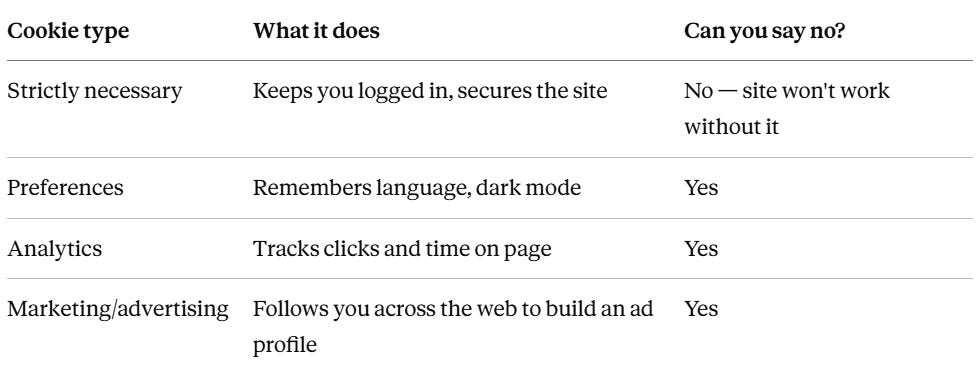
When you click “Accept All,” it’s not just that one website watching. Dozens of advertising networks start recording what you view, your device, your location, how long you stay there. When you click “Reject Non-Essential,” the site still works fine, you’ve just declined to feed the advertisement machine. That single tap is the first and biggest consent decision you make on the internet, dozens of times a day, usually on autopilot.
Many sites make “Reject” deliberately annoying, burying it under a tiny grey link while “Accept All” gets a big bright button. That’s a known manipulation tactic called dark pattern, and regulators have started fining companies over it. For example, France’s privacy regulator fined Google and Meta a combined €210 million in 2022 specifically for making tracking easy to accept while making it difficult to refuse tracking.
Every “Accept All” adds to your footprint.
When you say “yes” enough times, on enough sites, over enough years, these consents turn into something bigger: a footprint. Every cookie accepted, every quiz taken, every loyalty card scanned becomes one more data point sitting somewhere, tied to you. Old forum accounts from 2012, location history from a fitness app, photos you posted years ago that are now training material for facial recognition systems. Individually, none of it feels dangerous. It’s the accumulation that matters, a decade of small “yes” clicks can turn into a surprisingly complete picture of your life.
And this footprint becomes visible to people you’ve never met: Data Brokers.
This is where consent and footprint meet the third force: visibility. Once your data exists, someone has to be able to find it and connect the pieces. That’s exactly what a data broker does. A data broker is a company that pulls together information about you from public records, store loyalty programs, app trackers, and social media, then stitches it into one profile using an “anchor” like your email, phone number, or advertising ID. You’ve probably never heard their name, you never signed a contract with them.
Every cookie you accepted and every account you created gives data brokers another piece to work with. Here’s roughly how they turn scattered footprint into a sellable profile:
They collect the scraps (Ingestion): They pull from public records (voter rolls, court filings), commercial data (loyalty cards, purchase history), and online trackers (location, browsing, app use), the very footprint discussed above.
They match it all to you (Identity resolution): An algorithm lines up all of that scattered data using your email, phone, or device ID as the thread that ties it back to one real person.
They guess who you are (Categorization): Based on your behavior, they sort you into labels like “Expectant Parent”, “Financially Strained”, “Health Risk”, etc.,
They sell the label (Sale): Those labels get sold to advertisers, insurers, lenders, background-check sites, sometimes law enforcement and political campaigns - who use the same behavioral labels to decide who to target with which message and how to try to sway them during elections.
Every time you hand over your real email or phone number for “5% off,” you’re handing a broker glue to paste onto your profile.
Why “I don’t have anything worth stealing” doesn’t hold up
A common reaction from people is: “I don’t have anything valuable, there’s nothing worth stealing, so why worry?”
That’s a fair instinct, but it’s answering the wrong question. Data privacy is not really about theft, it’s about being sorted into a list. The lists that matter most to data brokers aren’t built around who’s wealthy.
For example, in 2013, a U.S Senate Commerce Committee investigation found brokers selling consumer lists with names like “Rural and Barely Making It”, “Ethnic Second-City Strugglers”, “Credit Crunched: City Families” - these were groups built specifically around financial hardship. The Committee’s report was direct about who buys them: these lists “appeal to companies that sell high-cost loans and other financially risky products to populations more likely to need quick cash”.
In a separate case, brokers’ lists were used by telemarketers to “target vulnerable, lonely, and sick seniors and drain their bank accounts”.
So flip the framing. It’s not “I have nothing worth taking”, it’s “I’ve been flagged as someone worth targeting, precisely because money is tight.” Being categorized as financially strained doesn’t make someone less interesting to predatory lenders, extended-warranty scammers, and “debt relief” schemes. It makes them the exact audience those businesses pay to reach.
When visibility gets weaponized: the Cambridge Analytica case
What’s at stake when consent, footprint, and visibility line up in the wrong hands?
In 2018, it came out that a personality quiz app on Facebook, downloaded by roughly 270,000 people had harvested data not just from those users, but from their friends too, reaching an estimated 87 million people worldwide. That data ended up with Cambridge Analytica, a political consulting firm, which used it to build psychological profiles for targeted political advertising ahead of the 2016 US election.
Nobody hacked anything. People just clicked “allow” on a quiz, the way people click “Accept All” on a cookie banner every day. Their footprint, friend lists, likes, activity, etc., became visible to a firm they’d never heard of, which used it to try to shape how millions of people thought and voted. The fallout was enormous: Facebook was hit with a $5 billion FTC fine, and Cambridge Analytica itself collapsed into bankruptcy.
The solution: you can lock this down in an afternoon
Once you can see the chain (Consent, footprint, visibility), the fix becomes obvious. Interrupt at each link:
A small consent decision → feeds your footprint → becomes visible to someone with an agenda.
Preventing this isn’t about disappearing from the internet. It’s about making sure companies can’t connect your online activity back to your real identity. Here’s the checklist.
1. Set up real tracker blocking: This is the single highest-leverage step, so it goes first. You have two options, and both genuinely work:
Option A: Switch your internet browser to Brave or Firefox.
Personally, I use Brave. It looks and feels like Chrome (it’s built on the same underlying code), but it has a built-in system called Shields that blocks ads, trackers, fingerprinting scripts, and cookie consent banners automatically at the browser level, before anything loads. There’s nothing to configure. Firefox can also be used alternatively, it has built-in enhanced tracking protection as well.
Option B: If you don’t want to switch your browser, use extensions.
If switching browsers isn’t realistic, you can rebuild most of the protection that you get with Brave with a pair of free extensions, each one covers a different half of the job:
uBlock Origin: This extension blocks ad and tracking scripts before they load.
Note: Chrome no longer supports the full, original uBlock Origin (it was removed from the Chrome Web Store after Google’s 2024–2025 extension changes), so Chrome users now install “uBlock Origin Lite” instead. It’s less powerful than the original, but still cuts a large share of tracking.
Consent-O-Matic: This extension handles the cookie banners automatically. It detects a site’s consent pop-up and clicks “reject” on every non-essential category for you automatically, so you stop seeing the cookie banners entirely.
An alternative solution that does a similar job differently is CookieBlock, built by ETH Zurich researchers: instead of clicking the banner, it uses a small machine-learning model to identify and delete tracking cookies directly. It removes over 90% of them.
Together, uBlock Origin stops the trackers hiding on the page, and Consent-O-Matic (or CookieBlock) handles the consent side, this combination is the closest match to what Brave does automatically in one package.
2. Mask your email and phone number: Your primary contact details are your universal ID online, brokers use them to link every account back to you. You can set up masking on Brave (desktop-only for now, mobile support hasn’t shipped yet):
go to Settings → Autofill → Email Aliases, sign in with a free Brave account, then right-click any email field on a sign-up form and choose New Email Alias.
Alternatively, Firefox provides Firefox Relay which works for both desktop and mobile. There are apps like SimpleLogin that provide free masking service for emails.
For masking phone numbers, use apps like Google Voice or MySudo. These apps provide a secondary phone number that can be used for loyalty programs and sign-ups. Calls and texts still reach you, but your real number stays private.
3. Lock down app permissions:
On Android: Settings > Privacy > Permission Manager > Location: set non-essential apps to “Only while using the app” or “Don’t allow.”
On iPhone: Settings > Privacy & Security > Tracking: turn off “Allow Apps to Request to Track,” and set Location Services to “While Using the App” or “Never” for anything non-essential.
4. Say no at checkout: Decline the request for your email or phone number when a cashier asks. If you use loyalty cards for the discount, sign up with a masked email and a name that isn’t tied to your real identity.
5. Slow down on cookie banners when you see them: Your blocker will catch most of them, but on any site it misses, take the extra five seconds to find “Reject All” or “Essential Only” instead of tapping the big colorful “Accept All” button out of habit.
None of these take more than a few minutes each. Do them once, and they keep working in the background for years.
Data privacy is about noticing the dozens of small moments each week where you’re asked to hand something over in exchange for consuming digital content, and getting into the habit of asking “does this actually need my real information?” Most of the time, it doesn’t.
Pick one thing from the checklist above and do it today, mask your email on the next sign-up, or turn off “Always” location tracking on one app. Shift from giving your data away by default, to deciding, on purpose, who gets it.
References
Facebook Cambridge Analytica scope, Facebook’s FTC fine, and Cambridge Analytica’s bankruptcy: CBS News, BBC, Huntress
CNIL fines against Google and Meta over cookie consent design (2022): https://www.reuters.com/world/europe/france-imposes-fines-facebook-ireland-google-2022-01-06/
Data broker mechanics, cookie categories, and privacy protection steps: adapted from the source document provided, cross-referenced with Proton’s data broker explainer
Data broker lists targeting financially vulnerable consumers (”Rural and Barely Making It,” etc.) and their marketing to high-cost lenders: U.S. Senate Commerce Committee report, 2013, CFPB Data Broker Rule filing
InfoUSA data broker lists used by telemarketers to target and defraud vulnerable seniors: Senator Markey press release, 2007
uBlock Origin’s removal from Chrome and the shift to uBlock Origin Lite following Chrome’s Manifest V3 changes: ublockorigin.com, Neowin
Brave’s built-in Shields blocking ads, trackers, fingerprinting, and cookie banners by default: AdBlock Tester browser comparison
Consent-O-Matic, developed by Aarhus University’s CAVI research group: Mozilla Add-ons
CookieBlock, developed by ETH Zurich’s Information Security Group, and its cookie-removal testing results: ETH Zurich news release
CookieBlock link: https://infsec.ethz.ch/research/software/cookieblock.html
App links:
Brave browser link: https://brave.com/
Firefox browser link: https://www.firefox.com/
uBlock Origin links: https://github.com/gorhill/ublock
Chrome uBlock Origin Lite link: https://chromewebstore.google.com/detail/ublock-origin-lite/ddkjiahejlhfcafbddmgiahcphecmpfh
Firefox uBlock Origin link: https://addons.mozilla.org/en-US/firefox/addon/ublock-origin/
Consent-O-Matic link: https://consentomatic.au.dk/
SimpleLogin link: https://simplelogin.io/
MySudo link: https://anonyome.com/individuals/mysudo/